

Quorum node
The Quorum node in full — how many experts label each item, the array shape of every output, quality control by LLM review or expert agreement, the expert audience, and pricing.
The Quorum node has the same item labeled independently by one or more expert labelers and returns the full set of their labels, one label per expert. It computes no consensus: the labels come back as a raw array, and reducing them to one value, such as a majority vote, is the job of a following Code node that reads the array. Agreement among experts is used only to remove experts who repeatedly disagree with the group. Every setting described below can be set by asking the agent or edited by hand on the node’s cards until deploy. The one exception is the onboarding on/off switch, which only you control (see Onboarding). The other kinds of nodes a pipeline can contain are listed in Pipeline nodes.
Number of experts
Section titled “Number of experts”Overlap is the number of experts who independently label each item to start with. Set a whole number from 1 to 100. The same starting count applies to every item and does not react to expert disagreement. Under LLM review, rejection can bring in additional experts beyond it (see When review rejects every answer). No-review mode requires at least 3 (see Quality control).
A single run feeds the node at most 10,000 items — a platform-wide per-run cap (Label a large dataset in batches covers larger workloads). The overlap sets no cap of its own on the answers a run collects: each item starts at overlap answers, and escalation can add more.
One expert means a single label per item, but the output shape does not change: outputs remain arrays, of one element or more if review rejections add answers. Verdicts stay per-expert arrays too, unlike the plain values the Generation node, the single-expert labeling node, returns.
Both the expert payout and LLM review scale directly with this count: doubling the number of experts doubles both. A video field that a criterion reaches through field links, under LLM review, also bills a video-tool call per answer, so that scales with the overlap too.
Input and output fields
Section titled “Input and output fields”The node needs at least one field each expert reads (input) and at least one field each expert fills in (output). Input fields have no array shape because every expert reads the same item. Every output comes back as a per-expert array. See Fields and data for why. A repeating output is an array of arrays, with one inner array per expert. Each expert produces up to a declared maximum of 1 to 50 values. An optional output an expert leaves blank keeps its slot, filled with null.
Leave the length of an output’s array open, because the number of answers varies from item to item. The deploy is blocked when an output’s type schema gives the array a minItems above 1 or a maxItems below the overlap (below twice the overlap under LLM review, see When review rejects every answer). It is also blocked when the array’s schema uses allOf, anyOf or oneOf: set length limits directly on the array and put other constraints in items, the schema of each answer.
The array shape itself adds no cost. A repeating field checked by a quality criterion multiplies review calls (see Quality control).
Matching answers to experts
Section titled “Matching answers to experts”The node also returns a field named after the node with _annotator_ids at the end, for example rate_helpfulness_annotator_ids. It lists the ID of the expert who gave each answer.
All output arrays of the node line up by position. The first ID belongs to the first answer in every answer field and every verdict field, the second ID to the second answer, and so on:
{ "label": ["helpful", "not_helpful", "helpful"], "rate_helpfulness_accuracy_evaluation_result": [ { "verdict": "pass", "reason": "Matches the guideline." }, { "verdict": "fail", "reason": "Ignores the user's question." }, { "verdict": "pass", "reason": "Matches the guideline." } ], "rate_helpfulness_annotator_ids": ["a3f9c1e08b", "b7e2d4f19c", "c1a8f3e05d"]}- An answer that review rejects keeps its position. The verdict fields at the same position show what review decided.
- An answer that the platform’s automated anti-fraud screening rejects is removed from every array, together with its expert’s ID. A replacement answer is added at the end unless the item is canceled first.
- One expert can hold more than one position in the same item. Do not assume that each position is a different person.
- The field can be missing on an item. It is missing on items that finished before the field existed, and on canceled items that got no answers. A canceled item with some answers lists the experts of those answers.
- The field is written to your dataset next to the answers. To use it inside the pipeline, add it as an input of the next Code node. To get it in the run export, add it to the outputs of the End node. Both cards add it as optional, because the node does not write it on every item.
Instructions and the labeling interface
Section titled “Instructions and the labeling interface”The written instructions each expert follows, the labeling interface they submit work in, and the display name they see (the node’s Display name card). Instructions are free text and must not be empty. The display name is required and at most 64 characters. The labeling interface presents one expert’s view: each expert submits their own entry for every output field, with one value for a plain field, several for a repeating field, and none for an optional field they leave blank. These settings do not affect cost.
Quality criteria
Section titled “Quality criteria”The checks that define good work on this node. See the shared quality model for what a criterion is and the floor it clears to deploy. A criterion may target any output field, and a field may carry more than one criterion. Unlike a single-expert labeling node, not every output field needs one — but the node still needs at least one quality criterion to deploy, including under no review. Under no review the criteria are shown to experts as read-only guidance, produce no verdict fields, and add no cost. Under LLM review, each criterion adds review calls (see Quality control).
Quality control
Section titled “Quality control”How each expert’s work is checked: automated LLM review or no review (the card calls it No QA, Offboarding Only). This node has no human review. See the shared quality model for how review, verdicts, and the review metadata field work. When LLM review runs here, that review metadata field (_qa_metadata) is not guaranteed a value on every item. No review returns no verdicts and no review metadata field, and protects quality only by removing experts who repeatedly disagree with the group (see Expert offboarding). The _annotator_ids field stays available in both modes (see Matching answers to experts). No review requires all of:
- at least one expert-offboarding rule;
- at least 3 experts per item;
- a single-label output field — one where each expert picks exactly one label — for agreement to be measured on;
- the per-expert task cap turned off.
LLM review is billed per call at the chosen model’s rate. The model is picked under Quality Assurance, or on this node by asking the agent (see the shared quality model). No review adds no review charge. In the cost estimate, the call count multiplies along these dimensions:
| Dimension | Effect on review calls |
|---|---|
| Quality criteria | One call per criterion per item |
| Experts per item | Multiplied by the expert count |
| Repeating fields in the chain the checked field derives from | Multiplied by each repetition maximum |
| Estimate maximum | Doubles the per-item call count to cover re-checks |
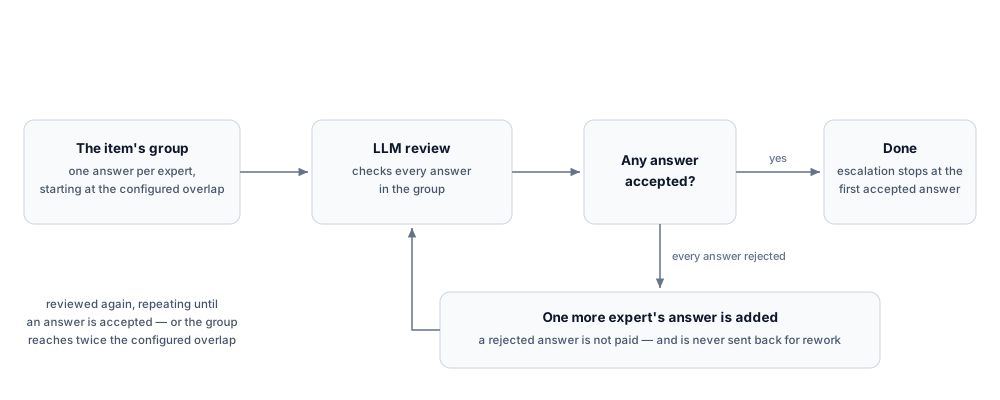
The doubling covers rejection-driven escalation (see When review rejects every answer). The expert payout stays at the configured count: a rejected answer is not paid, and escalation stops at the first accepted one, so paid answers never exceed the overlap.
When review rejects every answer
Section titled “When review rejects every answer”Labeling starts at the overlap and may continue beyond it. If LLM review rejects every answer in an item’s group, the platform can add one more expert’s answer and review again, repeating while answers keep being rejected. An item can also end there: a group whose answers are all rejected may fail outright, and the item then carries a failure rather than a label. Each rejection adds a new expert instead of sending the rejected answer back for rework. A rejected answer is not paid. Every collected answer stays in the output array, accepted or rejected, except answers that the anti-fraud screening rejects (see Matching answers to experts), so a completed item is not guaranteed to hold exactly overlap accepted answers — a downstream Code node must tolerate both a longer array and rejected entries. The cost estimate covers this by doubling the per-item review-call count in its Maximum column — a budgeting assumption, not a guaranteed ceiling on how far a group grows.
LLM review also protects quality across items. Every deployment with LLM review restricts an expert from taking further tasks on the node when their accepted share of reviewed answers, counted over a 90-day window, falls to 70% over their last 10 or 80% over their last 20.
Expert offboarding
Section titled “Expert offboarding”An offboarding rule removes an expert from the node when they repeatedly land in the minority on a chosen label. Agreement is scored per item once all its labels are in.
- Trigger — removal fires when four scored items in a row miss the majority. The node looks at the expert’s last 50 scored items, and only at items scored within a 14-day window. Four scored items are the whole requirement: the rule asks for no longer history, so an expert can be removed on their fourth scored item on the node.
- Majority — an expert agrees on an item when their label matches the answer given by more than half of all the labels submitted for that item, the expert’s own included.
- Field — each rule measures agreement on one single-label output field (one where each expert picks exactly one label) that maps to a top-level field. More than one rule is allowed, but each label field can be used by only one rule.
- Availability — offboarding is available only under no review, with at least 3 experts per item and the per-expert cap off. No review requires at least one such rule.
- Effect — the rule removes the expert for good. They keep any items already assigned to them and receive no new ones. It grades no individual label, rejects nothing, leaves the returned array unchanged, and adds no cost.
- Pacing — while a rule is set, the node also stops issuing new items to an expert who has 20 or more submitted items still waiting for an agreement score, counted over the same 14-day window. This is not a removal: it lifts by itself as each score arrives, and it keeps the expert’s assigned items. It exists because agreement can only be scored once every label for an item is in, so a fast expert can otherwise finish many items before the first score exists.
Expert audience and pricing
Section titled “Expert audience and pricing”Who labels the items and what each expert is paid. A Quorum node always uses a labeling task, so data collection is unavailable. The audience is ID-verified experts or the wider unverified pool. Specializations require verified experts. You filter experts by languages, specializations, and countries. The audience card shows how many experts match the saved filters. When you ask the agent about the pool, it can count the same saved filters, so its number matches the card.
With the unverified pool and an exam, the node limits how many experts can join it, as on the Generation node. Here the expected tasks are the items the estimate expects at this node times the overlap.
| Setting | Allowed values |
|---|---|
| Price per task | US dollars, inside the audience’s range per hour of work: $12 to $90 without a specialization (suggested $21), or from $12 with one, the top following that specialization’s rates, and $3 to $24 (suggested $6) for the wider unverified pool. The range per task is the hourly rate times the expected time, divided by 3,600 and rounded to the cent, so a 30-minute task without a specialization accepts $6.00 to $45.00 |
| Expected time per task | Whole seconds, from 10 to 359,999 (99:59:59) |
| Per-expert task cap | 1 to 50 tasks, off by default |
The audience must match at least one expert, and its languages, specializations, and countries must exist in the audience catalog. The editor shows a problem under its field, saving through the API rejects it, and an agent’s write is saved with the problem reported back. The node will not deploy until it is fixed.
The per-expert cap cannot be combined with no-review mode. The per-task price you set is each expert’s payout. Your charge is that payout plus a 33% commission, billed once per expert per item, so the total payout scales with the number of experts. When the cap is on, it can raise the minimum number of experts the platform onboards.
Onboarding
Section titled “Onboarding”Experts complete this flow once before their first paid item. The course is optional (on or off). Turning it on or off is yours alone, on the node’s Onboarding card. The agent builds the course but never flips the switch.
Deployment enforces the same per-block contract as the Generation node: quiz questions with named options and a marked answer, no empty blocks, and worked examples only on a built interface. See its onboarding contract. When on, the course must have:
- 3 to 6 steps;
- a quiz among them;
- exactly one hands-on part, either a practice exercise or a set of worked examples;
- a stated role, goal, and success criteria for the expert.
Onboarding cannot be turned off when the node reuses the audience of a node that was deployed with onboarding (see Audience reuse).
It is charged once per expert who joins the node. The per-expert charge and the expert count are computed as:
- Charge basis — the derived onboarding duration divided by the expected task time, multiplied by the per-task price.
- Derived onboarding duration — 60 seconds for each text, quiz, or consent part, plus one full task time for the practice or worked-examples part.
- Estimated expert count — never below the number of experts per item. A per-expert cap can raise it further. The maximum assumes a fresh expert for every label: the number of items times the number of experts.
Audience reuse
Section titled “Audience reuse”Reusing the trained pool of experts from a node you deployed earlier lets returning experts skip onboarding. The reused node may be a past Quorum node or a past single-expert labeling node. The picker offers nodes from other pipelines of the same project. The underlying setting accepts any deployed source node your team owns. The two scopes are laid out under audience reuse on the Generation node. Only the labeling audience is reused because this node has no human-review stage to carry over. Experts who passed the earlier node’s onboarding receive tasks immediately. Experts removed by offboarding on the earlier node stay excluded here. When the earlier node was deployed with onboarding, this node’s onboarding must stay on. A deployment with it off is rejected. Returning experts are not charged onboarding again, lowering the onboarding total.
Related
Section titled “Related”- Overview of pipeline nodes — the other node kinds and how they compare
- Quality control — the shared review model behind LLM review and verdicts
- Fields and data — why every output comes back as a per-expert array