

Match node
The Match node in full — the input fields its conditions read, how conditions combine field tests with all or any, the equal and not-equal text comparison, the matched and default branches, error routing, and how the node shapes the cost estimate.
The Match node routes each item to one of several branches based on conditions you define. It reads the fields its conditions test and chooses the branch each item follows without producing new fields. It is one of the nodes you add between the pipeline’s Start and End. See the pipeline nodes overview for how it fits with the others.
Input fields
Section titled “Input fields”The node’s conditions read one or more declared input fields, each required or optional. A test can reference only a field declared here, and the conditions need at least one field to test. A test that references a field no longer declared on the node is a configuration error that blocks the deploy.
Conditions
Section titled “Conditions”You set the conditions and the input fields they test by asking the agent or by hand on the node’s cards. A condition is a named group of field tests, and each condition is one branch of the node. The node needs at least one condition, and each condition has three parts:
- a name;
- a combine mode, either AND (“all”, the default) or OR (“any”);
- at least one field test.
A condition name must:
- be 2 to 32 characters,
- start with a letter and end with a letter or digit,
- contain only lowercase letters, digits, and underscores,
- be unique across the node’s conditions.
A condition combined with all matches only when every test in it matches. Combined with any, it matches when at least one test does. Tests run in the order listed. Under all, evaluation stops at the first test that does not match, so a later test that would produce an error is never reached. Test order can decide whether the item takes another branch or fails. Under any, evaluation stops at the first test that matches.
Field tests
Section titled “Field tests”A field test compares one field’s value against a value you type into a single text box, with one of two operators: equal and not equal. A test reads one field. A location says which part of the field’s value to compare and must resolve to at most one value in a test.
Every comparison is made on text:
- a field value that is the number 5 matches when you type 5,
- an empty box, a null field value, and a location that resolves to nothing all count as the same empty text,
- a field value that is itself an object or a list never equals anything you type. Equal never matches it, and not equal always does.
Because tests compare text only, a numeric threshold such as a score above 0.8 is not expressible in a test directly. Routing on one relies on an upstream Code node that derives a text flag for a test to check.
A test on a missing optional field does not match. A test on a missing required field is an error. Under all, the error fails the item. Under any, it is set aside and fails the item only when no test in the condition matches.
Branches and routing
Section titled “Branches and routing”The node routes each item to one of its outputs: one branch per condition, labeled by the condition’s name, plus a default branch. Conditions are tested in the listed order, the first that matches wins, and an item that matches no condition takes the default branch.
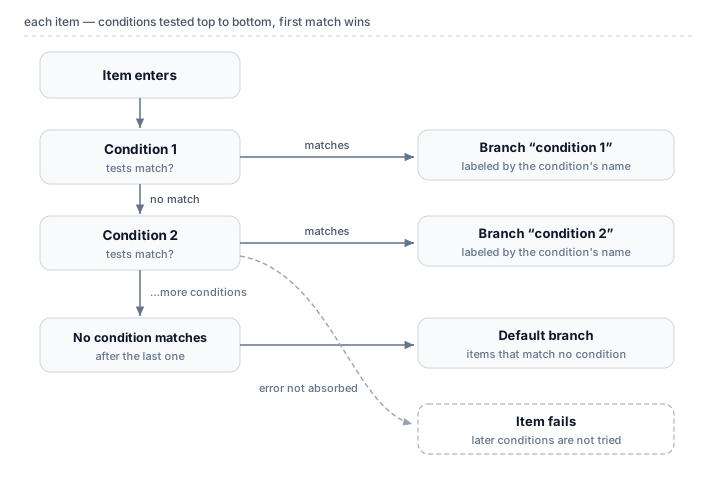
Any error under all, or an error with no matching test under any, fails the item rather than sending it to the default branch. The conditions after the failing one are not tried.
Effect on the run’s cost estimate
Section titled “Effect on the run’s cost estimate”Routing an item costs nothing because no price is attached to the node. The node still shapes the run’s estimate. The expected total assumes items spread evenly across the node’s branches. The maximum total sends the full item count through the most expensive complete path from Start to End, branches inside branches and every node after them included. The estimate does not know your real match rates.
Related
Section titled “Related”- Pipeline nodes — how the Match node fits with the other node kinds
- Code node — derive a text flag upstream to route on a numeric threshold
- Fields and data — fields, values, and the locations a test reads
- Glossary — branch, condition, and location defined briefly