

How the platform works
How work is divided between you and the agent — you describe the task and approve the calls that cost money; the agent builds, configures, and checks the pipeline.
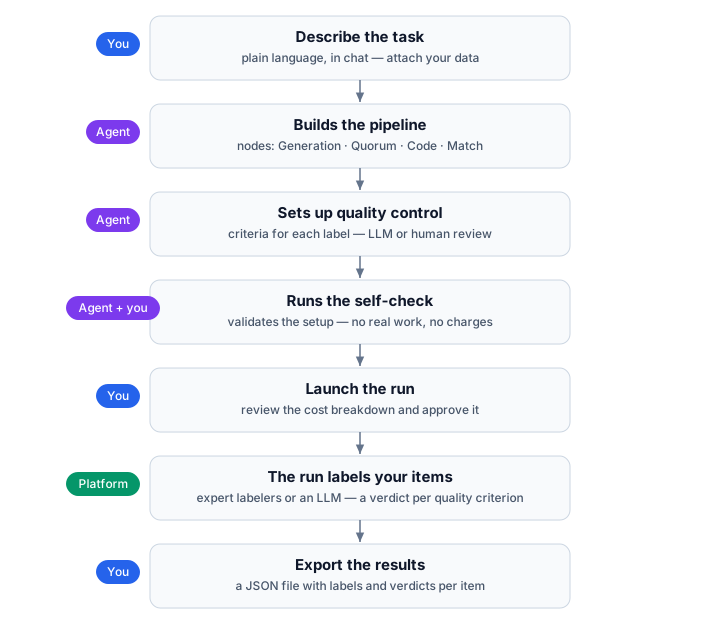
The platform gets data labeled for you. You describe the task in plain language, and an agent builds and configures the pipeline that will do the work. You launch the run, and the pipeline processes your items through expert labelers or an LLM with synthetic labeling, then writes the results back. You decide what the task is and make the calls that cost money. The agent handles the configuration.
Describing the task
Section titled “Describing the task”You start by telling the agent in a chat what you need labeled. For example, “classify these support tickets by intent” or “draw bounding boxes around every cat in these images.” You don’t need to assemble or configure the pipeline by hand.
From that description the agent assembles a pipeline: a sequence of nodes that takes your data in and produces labeled results. It decides which kinds of nodes the task needs, sets up the instructions and the labeling screen the experts will see, and sets the expert audience (languages, specializations, countries) and the pricing. When the data format, the languages your labelers should speak, or a quality threshold is ambiguous, it asks you rather than guessing.
You provide the task and your domain knowledge. The agent applies the labeling-project expertise built into the platform. You can still adjust what it builds, but you don’t have to know how to run a labeling project to get one running.
What a pipeline is made of
Section titled “What a pipeline is made of”A pipeline is a connected set of nodes. Each node is one of a small, fixed set of kinds, and the agent picks the kind that fits each part of your task:
- Generation node (reference). One labeler per item: annotating images, writing or rewriting text, rating or comparing outputs, or checking the output of a model. Expert labelers do this work by default, and it is the only node that can hand the same job to an LLM instead.
- Quorum node (reference). The same item is labeled independently by several experts (you choose how many), and you get back all of their answers, so you can see where they agree and where they disagree. It does not decide a winner for you. If you want to reduce the answers to a single value, a following Code node computes it.
- Code node (reference). A deterministic transformation: parsing, filtering, math, or calling an external service. Use this when the answer can be computed from the input without human judgment.
- Match node (reference). Routes items down different paths based on their content, so different items get handled differently.
The agent chooses these nodes and connects them from your description. Knowing the kinds of nodes exist helps you read what the agent built and ask for changes in the right terms.
How quality is controlled
Section titled “How quality is controlled”Labeled data is only useful if it is correct, so quality control is on by default on every labeling node. Which reviewer checks the labels, and for which items, is the node’s review path. See Quality control.
The self-check
Section titled “The self-check”To catch mistakes before you spend anything, the agent sets up checks on the nodes it built. It runs the code nodes on sample inputs automatically and confirms they behave correctly, and it sets up a check for the labeling screen that you preview by hand in the editor, since a person has to look at the screen.
Configuration errors block launch, and so does a failed check. Most unrun checks are warnings you can review and override, but the built-in lint checks must have run before you deploy: two on each labeling node, one on the Start node. This check covers only the configuration and catches mistakes while they are still free to fix. Real data and small paid pilots are outside its scope.
For the full model, including the kinds of check, who runs them, and how the Issues window sorts errors from warnings, see Self-check.
Launching a run
Section titled “Launching a run”Real labeling costs money, so the decision to spend is always yours. When the pipeline is built and free of errors, you launch the run. The agent does not start it for you. If you want to bound the cost, you can set a cap on how many items the run processes, so you label a subset rather than the whole dataset. Two facts shape what you approve: a single run launches at most 10,000 items, and the price you set for experts is their payout. Your charge adds the platform commission on top.
Results
Section titled “Results”While a run is going, you can track its progress and look at individual results as they come in. When it finishes, you export the labeled dataset.
One pipeline, one run
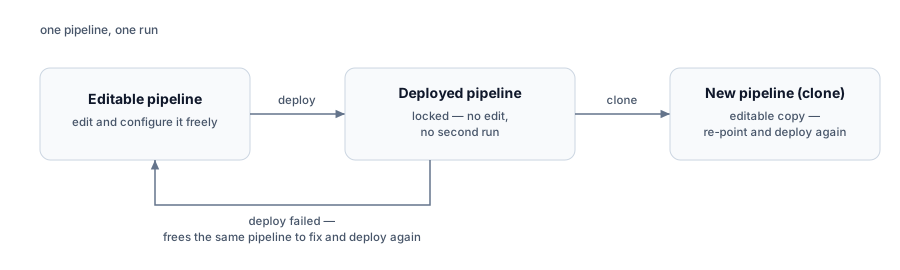
Section titled “One pipeline, one run”Deploying locks the pipeline: you cannot edit it, and you cannot run it a second time. The one exception is a failed deploy, which frees the same pipeline to fix and deploy again. To label another batch, clone the pipeline, re-point the copy, and deploy again.
For the full workflow, see Label a large dataset in batches.
Who does what
Section titled “Who does what”- You state the task, supply your data and domain knowledge, ask for human review where a node supports it, and approve the spend by launching the run.
- The agent builds and configures the pipeline, writes the instructions and the labeling screen, sets the quality criteria, sets the expert audience and pricing, and checks the configuration before anything runs.
Related
Section titled “Related”- Get your first labeled dataset — build and run a pipeline end to end.
- Fields and data — the data model a pipeline reads and writes.
- Quality control — how a node’s labels are reviewed.
- Pipeline nodes — what each kind of node does.