

Fields and data
The data model behind every pipeline — how a dataset item's fields carry values, how the Start node, each node, and the End node read and write those fields, and what "repeating", "optional", a value's location, and a per-expert list mean.
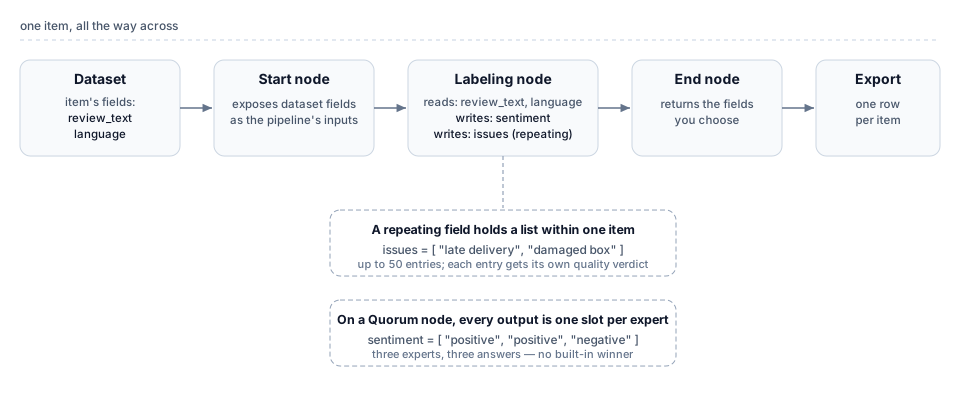
A pipeline reads and writes fields. Here is one item from a support-ticket dataset:
{ "ticket_text": "Hi, how do I reset my password?" }The ticket is one item, ticket_text is a field, and the sentence is its value.
A dataset is a collection of items. One item is one thing you want labeled, such as one support ticket or one image. Each item carries named fields, and each field holds a value: the ticket’s text, its language, and, once the pipeline has run, the label an expert or a model produced. The diagram traces a single item across a pipeline as it gains new field values. The node pages use the field properties and value shapes defined here.
How data moves through a pipeline
Section titled “How data moves through a pipeline”A pipeline reads one dataset and processes each of its items independently. Every step reads or writes fields.
The Start node binds to the dataset and exposes its fields as the pipeline’s input fields. Every later node can build on those values. As the item travels, each node in between declares the fields it reads and the fields it writes: it takes named input fields, does its work, and adds its output fields to the same item. A labeling node adds the labels it produced. A Code node adds whatever it computed. At the end of the run, the item carries its original inputs plus every field the nodes wrote.
The End node returns the fields you choose from everything the pipeline produced. The export carries one entry per item: the item’s input fields, plus the output fields the End node returns. An output field that no node writes, or that the End node does not return, never reaches the export.
What a field carries
Section titled “What a field carries”A field has a value and properties. Its properties decide whether a node accepts an item, what the value is allowed to be, and where the value came from.
Required or optional. Each field a node reads is one or the other. When an item reaches a node with no value for a required input, the item fails there and goes no further. On the Start node, an item missing a required input fails on entry, before any labeling, and the failure names the missing inputs. An item that is missing only optional inputs runs without them. Marking an input optional is how you let items through when a value is sometimes absent.
A name and a type. Every field has a name and a type: text, a number, an image, a video, a choice from a fixed set of options, and so on. The type sets what a valid value looks like. A node that writes a value not matching its field’s type fails the item. Fields a labeling node writes also carry a short description, which tells the expert or the model what to produce.
A source. A single field can hold up to 500 recorded values over an item’s life, and each value has a source: the person or the automated source that recorded it, such as an earlier pipeline run. When a node reads a field, it reads the latest value by default. The Start node’s item filter is where the source matters most: it can select items by a field’s value, by the source that recorded a value, or by a value’s absence, and every run also pins a cutoff timestamp, so an item added after the deploy is never picked up.
Fields that repeat within an item
Section titled “Fields that repeat within an item”Most fields hold one value per item. A repeating field holds a list of values. A field that asks an expert to name every issue in a ticket is repeating: the item gets a single list with as many entries as it warrants.
A repeating field declares a maximum count, a whole number from 1 to 50, and that cap has two knock-on effects:
- A quality criterion on a repeating field returns a list of verdicts, one for each value in the list.
- Because each value is reviewed on its own, LLM review of a repeating field multiplies the estimated review calls by the cap. A field capped at ten values costs up to ten times the review of a single-value field. This is the main reason a high cap raises a run’s cost estimate.
A field either repeats or it does not. The choice is fixed when the field is defined and applies to every item.
Pointing at a part of a value
Section titled “Pointing at a part of a value”A value can be a single thing, such as a word or a number, or it can be structured, with named parts and lists inside it. To point at one part of a structured value, use a location.
A location starts at the value’s root, written $, and steps inward one part at a time through a named member or a list position:
$is the whole value.$.scoreis the member namedscore.$.answers[0].labelis thelabelof the first entry in theanswerslist.
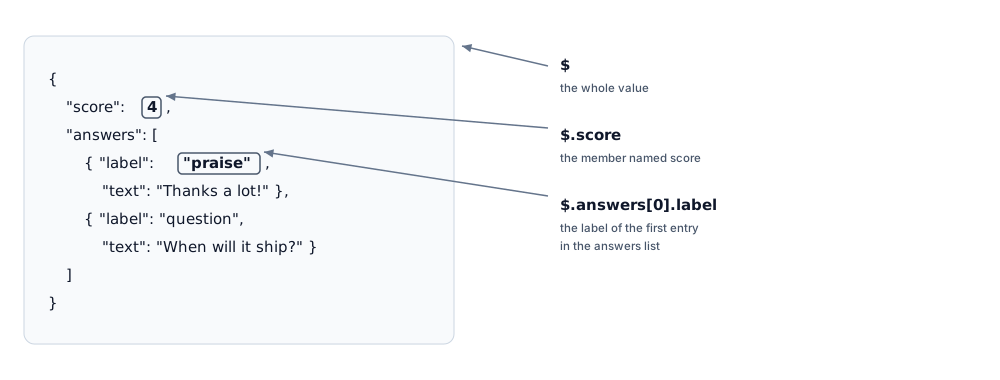
Locations appear wherever something points into a structured value:
- A Match node test compares the value at a location, so you can route on one part of a value without reading the rest.
- An item filter, on the Start node or in the dataset browser, can point below the value’s root when it selects items by a field’s value.
- A repeating field’s declaration carries the location that marks the position that repeats. This is how a quality criterion on that field returns one verdict per repetition.
- A derived field extracts its value from the raw upload at the location you give it.
A location used for routing must resolve to at most one value: ranges, wildcards, and searches that could select several parts at once are not allowed there.
Why every Quorum output is a list
Section titled “Why every Quorum output is a list”A Quorum node has the same item labeled independently by several experts and returns their answers for each field. Every output field on a Quorum node therefore comes back as a list, with one slot for each answer the node keeps (see Matching answers to experts). The list length is normally the configured overlap. Three experts labeling one field give a list of three. Review rejections can bring in additional experts, so the list can be longer. An optional field an expert left blank still occupies its slot, filled with null:
"sentiment": ["positive", "positive", null]A repeating field on a Quorum node combines both shapes: each expert produces a list, and the node returns a list of those lists, with one inner list per expert:
"issues": [["late delivery", "damaged box"], ["late delivery"], []]The node only assembles these lists. It computes no majority, average, or agreed answer. Reducing the lists to a single result is the job of a following Code node that reads them.
From one expert’s form to your fields
Section titled “From one expert’s form to your fields”An expert never sees your field model. They see a single form for a single item, filled in once. They read what the input fields show and enter a value for each field the task asks for: one value for a plain field, several for a repeating field, nothing for an optional field they leave blank.
The platform assembles what comes back into the item’s fields, in the shapes above: one value per field for a single-expert labeling node, a list per field for a Quorum node. The node that gathers the results sets the shape of a field on your side. Experts fill in the form the same way.
Related
Section titled “Related”- Start and End nodes — where a pipeline reads its input fields and returns its chosen output fields
- Pipeline nodes — how each kind of node reads and writes fields
- Export your labeled results — how fields reach the file you download
- Glossary — short definitions of field, item, dataset, and the rest