

Pricing and billing
How a run is priced — the cost breakdown forecast, what Expected and Maximum mean, the contract that freezes the price at deploy, the cost lines for expert and synthetic labeling, how your balance is drawn down and paused, and what a canceled or failed item costs.
A run’s cost is a forecast you approve before you deploy, then a pay-as-you-go charge against your team’s balance. This page explains how that forecast is built, what its Expected and Maximum totals mean, how deploying freezes the price for the life of the run, and how your balance is drawn down.
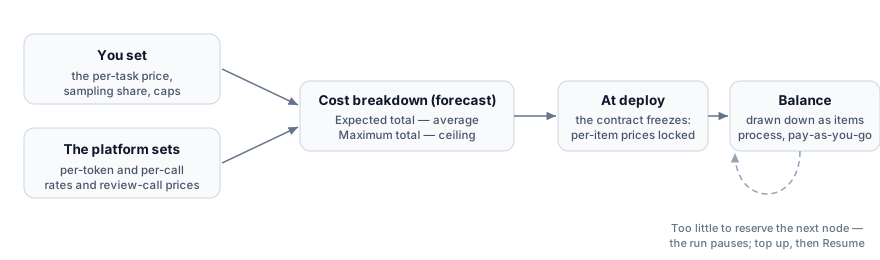
What you set and what the platform sets
Section titled “What you set and what the platform sets”Two sets of inputs feed the forecast. You set the per-task price each expert is paid, the share of items human review samples, and the per-expert task cap. The platform sets the per-token generation rates and the per-call review prices, and it estimates the tokens each item uses. The per-review price for human review is derived from what you set: your per-task price scaled to the review time, increased by a fixed percentage premium. The commission added to the expert payout is also fixed: the cost breakdown itemizes it as the base payout plus 33% commission, and you cannot change it.
The cost breakdown forecast
Section titled “The cost breakdown forecast”You never enter cost math by hand. When you deploy, the Cost breakdown (forecast) window computes the cost for the current run from its configuration and the current prices. The window groups rows by node: a header row per priced node, its billable lines nested under it, and LLM review lines expanding into one sub-line per quality criterion. Nodes that fail validation collect in their own section, excluded from the cost, which you can collapse. The table has columns Line, Price, Quantity, Expected, and Maximum, and a Total row at the bottom. This window is where the real per-task, per-call, and per-token prices appear.
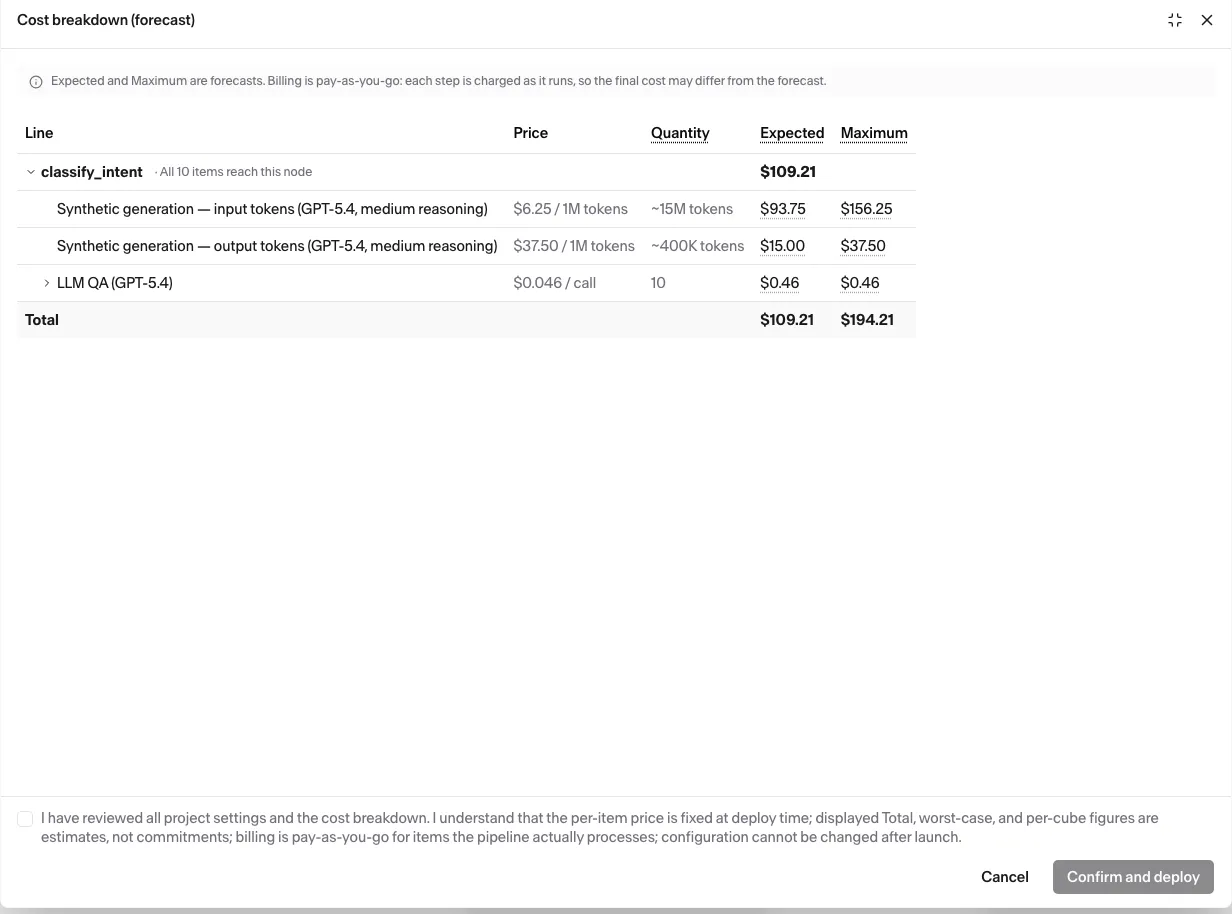
Each line carries two totals, and so does the run:
- Expected is the average forecast, or the run’s likely cost.
- Maximum is the run’s cost if every item triggered every billable event. It is the forecast ceiling.
Billing is pay-as-you-go for the items a run actually processes. The actual total can come in below Expected. Billing commits you only to actual costs, while Maximum caps the forecast.
The cost lines
Section titled “The cost lines”Each billable line applies to one labeling path and is priced by one unit. The table below contains the full set. The Cost breakdown (forecast) window lists the lines your pipeline actually incurs.
| Line | Applies to | Priced per |
|---|---|---|
| Expert Service Cost | Expert labeling | Each expert per item, at your per-task price plus 33% commission |
| LLM QA | Any node reviewed by an LLM | Each review call, with one call per quality criterion per labeled item at the review model’s per-call price |
| Human QA | A Generation node with human review | Each sampled review, at a per-review price |
| Onboarding (one-time per expert) | Expert labeling with an onboarding course | Once per expert who joins the batch, spread across the batch |
| Video tool | Any labeling whose LLM review watches a video field, expert or synthetic | One call per labeled answer, whatever the number of criteria, at a base rate plus a per-minute rate over every video watched. The criteria always bring in the video fields they reach through field links; synthetic labeling adds the video fields its outputs reach. A video field reached more than once counts once, and one that nothing links to is never charged. A video field with no declared maximum counts as five minutes |
| Synthetic generation — input tokens / cached input tokens / output tokens | Synthetic labeling | Each token, at the model’s per-token rates. Cached input is usually the largest volume and the cheapest rate |
A few lines scale with how the node is configured. Expert Service Cost is charged once per expert per item, so on a Quorum node it scales with the number of experts per item. LLM QA multiplies out to one call per quality criterion per labeled item, times the repetition maxima of repeating fields the checked output builds on, times the experts on a Quorum node. On a Quorum node the Maximum column also doubles the review calls to cover rejection-driven escalation. Other nodes add no extra review rounds. Human QA counts more than one review for an item sent back for rework, so the expected reviews per item can exceed one. Onboarding is spread across the batch. With the per-expert cap off, its per-item share shrinks as the batch grows.
The contract freeze
Section titled “The contract freeze”Deploying freezes the run’s price. The per-item prices computed in the forecast become the run’s contract and stay fixed for the life of that run. Later changes to the platform’s prices do not touch a run already deployed. Each run freezes its own contract. A clone is estimated and frozen fresh at its own deploy instead of inheriting the original run’s prices. The run’s Contract button reopens the frozen breakdown at any time.
Funding the run
Section titled “Funding the run”A run draws down your team’s balance as it labels, so the balance has to cover the run’s cost. A run cannot deploy on an empty balance. The hard gate is a balance of at least $0.01; reaching the run’s Maximum total is advice, not a requirement, and the window only warns when the balance falls short. When your balance is below that maximum, the deploy window shows up to three funding levels (Min, Expected, Max), dropping any that equals another so you can see how far your balance reaches.
The same insufficient-funds protection applies while deployment is still creating items: an item that cannot reserve its next node’s cost pauses, and the run records the pause. Wait for deployment to finish, then top up as shown in the banner before using Resume. The top-up banner and run controls remain hidden during deployment or if deployment fails. See Resume or cancel a run for the state transitions.
What a canceled or failed item costs
Section titled “What a canceled or failed item costs”When an item starts on a node, the platform reserves the node’s maximum cost for the item from your balance. When the item completes or is canceled on the node, you pay for the work recorded on the item, and the rest of the reserved amount returns to your balance. For the reserved lines, you never pay more than the reserved amount. Human QA and the lines marked one-time per expert are not reserved. You pay for them when the node ends.
How the item ends on the node sets what you pay:
| The item on the node | Reserved lines | Human QA and one-time per-expert lines |
|---|---|---|
| Completes | The recorded work | The recorded work |
| Is canceled | The work recorded until the item ends on the node. A line with no recorded work costs nothing | The recorded work |
| Fails | Nothing. The reserved amount returns in full | The recorded work |
On a canceled item, each reserved line counts this work:
| Line | Generation node | Quorum node |
|---|---|---|
| Expert Service Cost | One task, if the task was accepted. A task accepted without review when you cancel counts | Nothing |
| LLM QA | The review calls made | The review calls made |
| Video tool | One call, if LLM QA checked the item | One call per expert per item, if LLM QA checked an answer |
| Synthetic generation — input tokens / cached input tokens / output tokens | The tokens used, also by rejected generations | Does not apply |
For example, LLM QA rejects a Generation item, and you cancel the run before the expert’s redo. The item pays for the LLM QA calls made, and for 1 Video tool call if its LLM QA watches a video. The rest of the reserved amount returns to your balance. An item canceled before any work is recorded costs nothing.
How a Match node shapes the estimate
Section titled “How a Match node shapes the estimate”Routing an item through a Match node costs nothing on its own. Branching changes the totals: Expected assumes items spread evenly across the branches, while Maximum sends the full item count down the most expensive complete path. The exact rules live on the Match node reference. The forecast does not know your real match rates.
A Generation node with human review stops reviewing at the Maximum of its Human QA line: 3 reviews for each item of the run. This cap counts every item of the run, not only the node’s even share. A branch that receives more items than its share still gets human review on them.
Related
Section titled “Related”- Label a large dataset in batches — the cost window in the deploy workflow, and sizing a monthly volume
- Quality control — what review costs and why
- Generation node — the per-task price, review, and token settings that drive these lines
- Quorum node — how the expert count scales the expert and review lines