

Pipelines
How to decide which nodes a task needs — experts or an LLM, one answer or several, whether items branch, whether anything must be computed — so you can judge the pipeline the agent proposes and ask for changes in the right terms.
The agent builds your pipeline from a plain-language description. You do not assemble it by hand (see How the platform works). Your job is to judge the pipeline it proposes and to ask for changes when it does not fit the task. Knowing the node kinds lets you read what the agent built and ask for those changes in the right terms.
A pipeline runs each item from a fixed Start node to a fixed End node through the nodes in between. Each node produces labels, computes values, or routes items to a branch. Which nodes your task needs comes down to a few questions: who produces the labels, whether you want one answer per item or several, whether different items need different handling, and whether anything must be computed along the way. Quality control then applies to every labeling path.
Who produces the labels?
Section titled “Who produces the labels?”Two answers: expert labelers, or an LLM under synthetic labeling.
- Expert labelers are the default. People label each item, so you get human judgment on the task. You choose the audience they are drawn from and set what each task pays. How their work is reviewed is a separate choice, covered below.
- Synthetic labeling has an LLM produce the labels instead. It suits high-volume work where you accept automated quality control in place of expert review, and it is billed by tokens rather than a per-task payout.
Synthetic labeling has these constraints:
- It runs only on the Generation node. The Quorum node always uses expert labelers.
- It forces the review path to LLM review. Human review is not available on it.
- It is unavailable for data collection, where experts produce new content rather than label data you already have.
See Label with an LLM instead of experts for the switch, and the Generation node reference for the audience, pricing, and token settings.
One answer or several?
Section titled “One answer or several?”A single expert labels each item on the Generation node. The Quorum node has several experts label the same item independently and returns every answer, one per expert, so you can see where they agree and where they disagree. It picks no winner. To reduce the answers to one, such as a majority vote, you add a Code node after it.
The cost follows the expert count. Each expert is paid the full per-task payout, once per expert per item, so three experts on an item cost three payouts. LLM review, when it is on, multiplies the same way. Use several answers to measure agreement across experts or avoid resting a label on a single person’s call. Use one when a single answer is enough.
See the Quorum node reference for the answer array, expert agreement, and what happens when review rejects every answer.
Do different items need different handling?
Section titled “Do different items need different handling?”If every item takes the same path, you need no routing. If some items should be handled one way and others another, a Match node routes each item down a branch by testing its field values. Its tests compare text values for equality or inequality, so a Match node can route on a category or a flag. It cannot route directly on a numeric threshold. To route on a threshold, such as a score above a cutoff, put a Code node ahead of the Match node to turn the number into a text flag the test can read.
See the Match node reference for conditions, branches, and how routing shapes the cost estimate.
Do you need to compute anything?
Section titled “Do you need to compute anything?”A Code node runs Python once per item. Use it to reshape fields, compute a value, or call an external service when the answer can be derived without human judgment. It can prepare a routing flag for a Match node, reduce a Quorum node’s several answers to one, or call out to a system of your own.
See the Code node reference for the function contract, environment variables, and run-time limits.
How quality is enforced on each path
Section titled “How quality is enforced on each path”Quality control runs on every labeling node by default, and the Quality control page owns the full model. What differs by path is who can review. LLM review is the default wherever it is offered and checks every item. Human review checks a sample and is offered on the Generation node only. It is not available on Quorum or under synthetic labeling, which is locked to LLM review. A Quorum node can also run with no review at all, protecting quality by expert agreement instead: an expert who repeatedly disagrees with the group is removed. Match, Code, Start, and End produce no labels, so no review applies to them.
A worked example: triaging support tickets
Section titled “A worked example: triaging support tickets”Label incoming support tickets by intent. Most are routine and an LLM can handle them. A minority are ambiguous and need expert scrutiny. One pipeline routes each ticket to the treatment it needs.
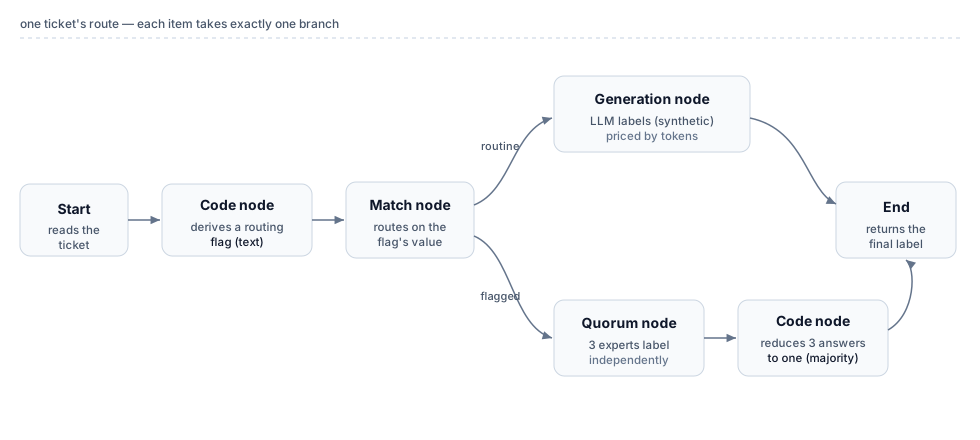
The route, node by node:
- The Start node reads each ticket’s fields.
- A Code node derives a routing flag from the ticket. For example, a rules check on the text can set
needs_expert. The flag has to exist as a value first, because a Match node tests values, not raw logic. - A Match node reads the flag and routes: routine tickets to one branch, flagged tickets to another. The test is a text comparison, which is why the Code node wrote the flag as text.
- On the routine branch, a Generation node under synthetic labeling has an LLM assign the intent. This is the high-volume, tokens-priced path.
- On the flagged branch, a Quorum node has three experts label the ticket independently. A Code node after it reduces the three answers to one by majority vote, since Quorum picks no winner on its own.
- Both branches connect to the End node, which returns the final intent label. Every branch must reach End, including the default branch a Match node always adds for items that match no condition, or the deploy is blocked.
The two branches cost differently. The synthetic branch carries no per-task expert payout, no onboarding, and no per-expert cap. It is billed by tokens, so the routine bulk stays cheap. The flagged branch pays three expert payouts per ticket, one per expert, plus its LLM review, only on the tickets the flag set aside. Routing lets you reserve expert scrutiny for the items that need it.
Ask the agent to build it
Section titled “Ask the agent to build it”You do not wire this route by hand. Describe the shape you want: “route the routine tickets to an LLM and send the rest to three experts, then take the majority”. The agent adds the nodes and connects them. Read back what it built, and adjust any setting either by asking the agent or by editing the node’s cards by hand. The two surfaces change the same settings, apart from a few asymmetries each node’s reference page notes.
Related
Section titled “Related”- Pipeline nodes — the comparison table for all node kinds, side by side
- How the platform works — how you and the agent divide the work of building a pipeline
- Quality control — the review model behind each labeling path
- Pricing and billing — what each path costs and how branching shapes the estimate